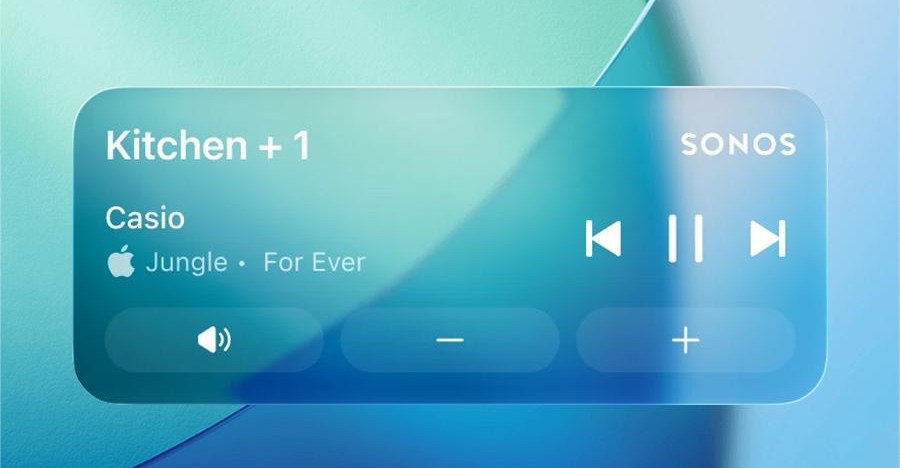
Here's the thing. Sonos originally put controls on your iPhone lock screen back in 2016. Then in 2023 the company quietly removed them because its integration method no longer aligned with Apple's updated design framework. Then in 2024 Sonos shipped a catastrophic app redesign that broke volume controls, connection handling, and basically everything else users relied on. Lock screen support, understandably, went to the back of the queue.
Now it's back. The latest Sonos iOS app update — version 80.16.32 — introduces Live Activities support, giving iPhone users playback controls and basic track info directly on the lock screen without having to fully unlock the phone and open the app. Sonos is calling it a 'much requested, anticipated, and needed feature,' which is one way to describe something you took away and spent two years fixing.
The implementation comes with caveats. Album art is not supported; Sonos says it is exploring 'alternative ways to enhance the lock screen experience.' The Live Activity works on Apple Watch and in CarPlay, but controls are not available on either platform — you can see what's playing, you just can't do anything about it. Full playback controls on the lock screen itself also require the phone to be unlocked via Face ID or a passcode first.
Setup is not automatic. Following the backlash to the 2024 redesign, Sonos ships the feature off by default. Users have to enable it in two separate places: the Sonos app's own preferences and the Sonos section inside iOS Settings. Once enabled, the Live Activity appears after playback starts and the app is closed, showing the room or group name and the current track. It disappears automatically 15 minutes after playback stops.
CEO Tom Conrad teased Live Activities support during a Bloomberg interview last February. The Android version of the app has had equivalent lock screen controls for some time.
Sonos says its team is continuing to work on the feature.
---
Read the changelog. After a 2024 app rollout that became a case study in how not to ship a major update — missing core features, broken basics, user revolt — Sonos has spent the better part of two years methodically rebuilding trust one software patch at a time. Lock screen controls are a small thing, but they are the kind of small thing that compounds: every restored feature is a reminder of what was taken away in the first place. The company still has ground to make up, and shipping a feature behind a two-step opt-in buried in settings is not exactly a confidence-maximizing move. But it ships. That counts for something.